For Canadian pharmacies running WinRx
See how your pharmacy is doing, every day
Pharmacy Dashboard turns the dispensing data already in WinRx into live reports, takes appointment bookings from your patients online, and gives your other systems a REST API into the pharmacy. One account, one store profile, no data entry.
Reporting
Your dispensing data, as charts you can read at a glance
Pick a period and any combination of filters — plan, prescriber, drug, facility, route, patient — and every figure on the page answers for that scope. Every chart sits beside the table behind it, and every table exports to Excel.
Patients by plan
| Plan | Patients | Rx count | Paid (CAD) |
|---|---|---|---|
| PharmaCare | 425 | 1,451 | 96,800.99 |
| Pacific Blue Cross | 222 | 840 | 56,042.68 |
| Cash | 190 | 633 | 35,663.52 |
| Green Shield | 107 | 381 | 25,473.94 |
| Sun Life | 101 | 343 | 22,926.55 |
| Manulife | 74 | 267 | 17,831.76 |
-
Dashboard
Counts, cost, fee, upcharge and compound fees against the same period last year. Revenue and fill trends, third-party plans, PharmaCare versus cash, busiest hours and weekdays.
-
Productivity
Fills per user over the period, and every billable service with what it paid: MAC assessments, med reviews, adaptations, minor ailments, public vaccines, methadone interaction, drug administration and PA witnessing fees. Plus the customers due for a full medication review.
-
Inventory
Stock value, top drugs by daily usage and trend, fast and slow movers, and days of supply from historical usage, so ordering follows what the store actually dispenses.
-
Customers
Who you serve, by age, gender and fill count, revenue per customer, and where they live on a map sized by prescriptions, for deciding on delivery routes and outreach.
Run several stores? Switch between them from the account menu and compare the same report store by store.
Online booking
Let patients book appointments themselves
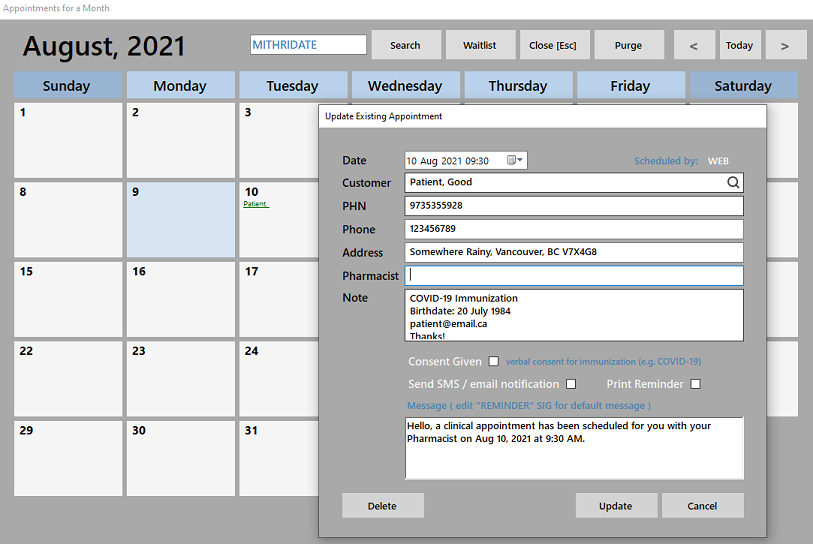
A booking page for your store that patients reach from your website, a link you send them, or the iEMR phone app. Bookings land in the WinRx Appointments module, where the reminders are sent from.
- You define the reasons — flu shot, medication review, travel consult — each with its own days, hours, interval and how many patients fit in a slot.
- Tie a reason to one or more DINs and the page checks your stock before it offers a time, so a vaccine clinic cannot overbook the fridge.
- Exclude specific dates such as statutory holidays.
- Patients get an email confirmation; when nothing is available, or you are out of stock, they can join a waitlist instead.
$40/month or $440/year CAD plus applicable taxes
How the booking system is set up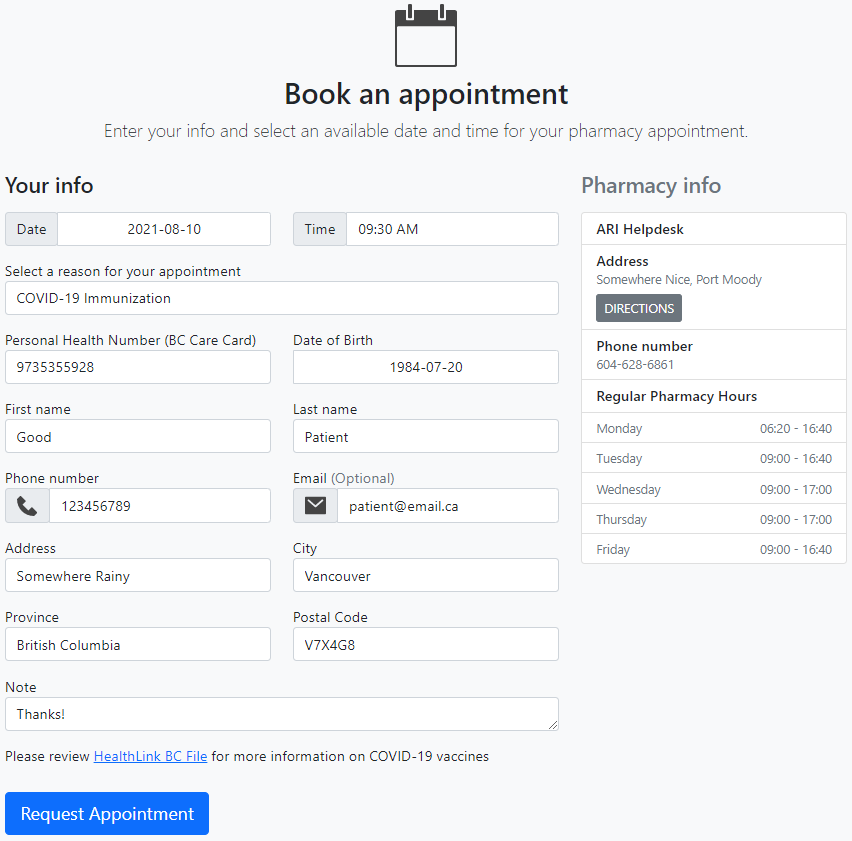
REST API
A documented API into the pharmacy
The same service that powers the booking page and the iEMR app is open to your own integrations. Token-authenticated JSON over HTTPS, with a reference you can read once you sign in.
- Patients — look up and register patients, contacts, consent, documents and life goals
- Prescriptions — a patient's prescriptions and transactions, refill requests, FHIR prescriptions and documents
- Drugs — one drug by DIN, or the whole catalogue
- Store — store profile, settings and dispensing statistics
- Appointments — reasons, availability, booking and cancellation
- Point of sale — pick-up and return events from your till
GET /api/getDrug/?PHARMACY_ID=1234&DIN=2242987
Authorization: Token <your token>

200 OK
{
  "DIN": 2242987,
  "LocalDIN": 5518,
  "GenericName": "ATORVASTATIN CALCIUM",
  "TradeName": "LIPITOR",
  "Manufacturer": "PFIZER",
  "Form": "TAB",
  "PackSize": 90,
  "InStock": 270,
  "UnitCost": 0.19
}
Getting started
What it takes
-
1
WinRx and WinRxAPI on your server
Reports and bookings run against your own pharmacy database through WinRxAPI, which needs a port forwarded to it on your network.
-
2
An account from support
Contact us to open the store and its users. Operators with several stores get one sign-in that switches between them.
-
3
A store profile
Your logo, hours and the appointment reasons you want to offer, set once under My Account.